
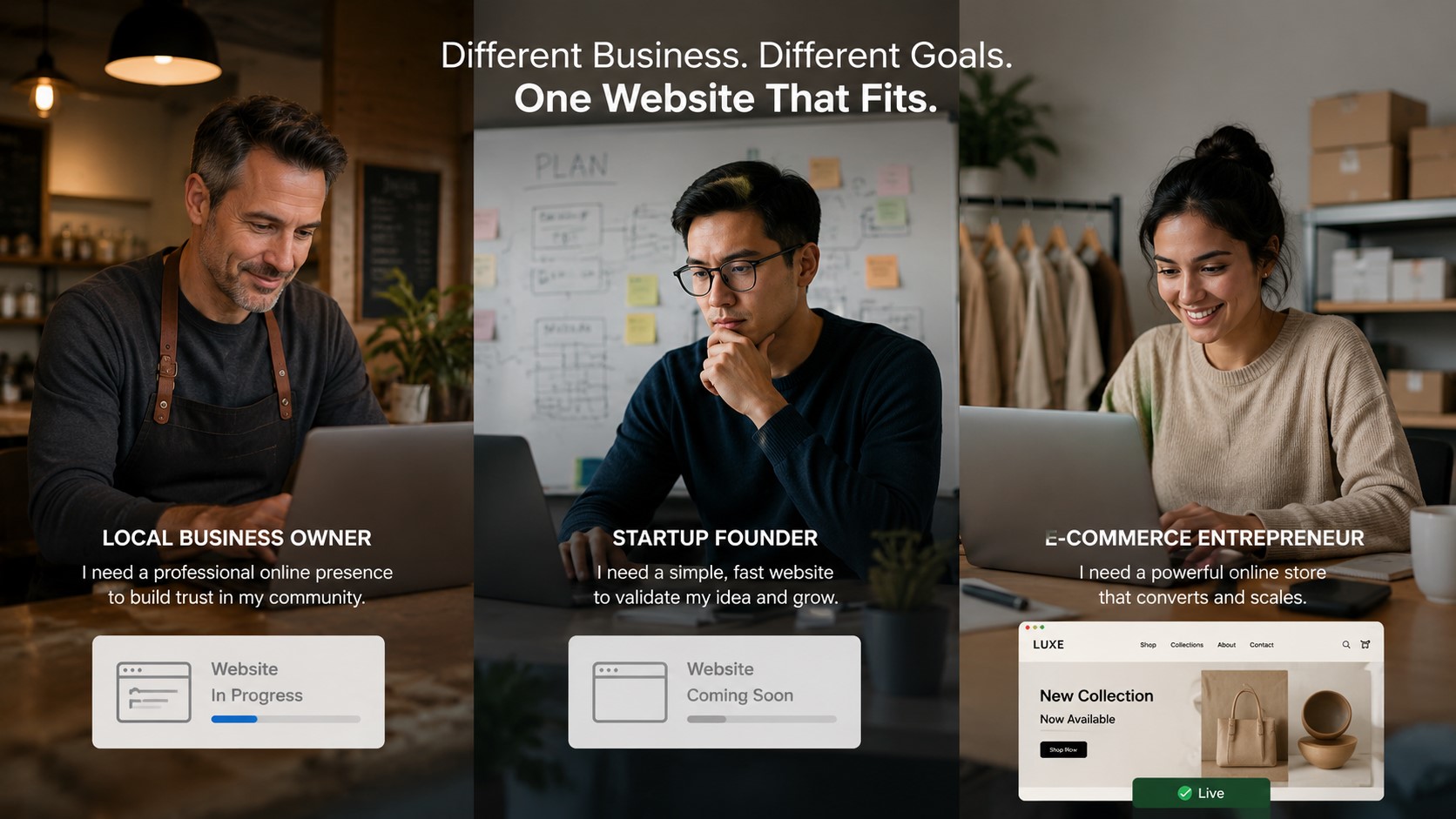
Web Design Packages & Pricing: Which Plan Is Right for Your Business?
Picking a web design package shouldn’t feel like defusing a bomb. But for most business owners, it does.
You open a pricing page, see three tiers with a wall of features, and immediately wonder: Am I paying for things I don’t need? Will the cheap option embarrass me? Is the expensive one actually worth it?
Here’s the problem: most pricing guides just list features and leave you to figure out the rest. That’s not helpful. What you actually need is a way to match the right plan to where your business is right now, not where you hope it’ll be in five years.
That’s exactly what this post does. We’ll walk you through a simple framework called the Business Stage Filter, break down what you’re actually paying for at each price point, and help you leave this page knowing exactly which plan fits your situation.
Why Most Businesses Pick the Wrong Web Design Package (And Pay for It Later)
Most people approach web design pricing the same way they approach buying a car. They set a budget first, then look at what fits inside it. That logic works for cars. It fails for websites.
A website isn’t a product you buy once and drive. It’s the foundation your entire online presence is built on. Pick the wrong one and you’re not just stuck with a bad site; you’re rebuilding from scratch six months later and paying twice.
The Real Cost of Choosing Too Cheap
A $400 website from a freelancer on a tight deadline usually comes with invisible costs.
No mobile optimization. No SEO setup. No support when something breaks after launch. You end up with a site that looks fine on your laptop and falls apart on someone’s phone, which is where over 60% of web traffic actually comes from.
The site becomes a liability instead of an asset.
The Real Cost of Choosing Too Much
Going the other direction is just as damaging.
A small local bakery doesn’t need a custom React build with inventory management and a payment gateway. Spending $5,000 on infrastructure your business won’t use for three years is money that could’ve gone into marketing, stock, or staff.
Over-speccing is its own kind of waste.
Introducing the Business Stage Filter
The Business Stage Filter is a simple idea: your website should match where your business is right now, not where you want it to be.
It asks three things: What does your business need from its website today? What’s the realistic traffic and conversion goal for the next 12 months? And what level of complexity can you actually manage after launch?
Answer those honestly, and the right package becomes obvious.
What a Web Design Package Actually Includes (Plain English Breakdown)
Before we talk numbers, let’s talk about what you’re actually getting.
A lot of business owners sign a contract without fully understanding what’s in it. Then they’re surprised when the finished site is missing something they assumed was standard. Let’s fix that.
The Non-Negotiables Every Package Should Have
No matter which tier you choose, certain things should never be optional.
Mobile-first, responsive design is one of them. If a package doesn’t lead with this, walk away. Google ranks your mobile site, not your desktop site. A non-responsive site in 2026 is a non-starter.
On-page SEO basics, a contact form, and at least one round of revisions should also be standard. These aren’t premium features. They’re the floor.
Features That Separate a Good Package from a Basic One
Once the basics are covered, the real differences show up in the details.
Custom UI design (built in Figma rather than dropped into a generic template) means your site actually looks like your brand. A Blog/CMS setup means you can publish content without calling a developer every time. Google Analytics 4 integration means you can see what’s working and what isn’t.
These features aren’t flashy extras. They’re what turn a website from a digital brochure into a working business tool.
What “Post-Launch Support” Really Means and Why It Matters
Post-launch support is one of the most underrated line items in any web design package.
Websites break. Plugins conflict. Forms stop submitting. A hosting issue can take your site offline at 2am before your biggest sales day. Post-launch support means someone has your back when that happens, instead of you trying to Google your way through a broken WordPress dashboard at midnight.
At Omayik Digital, every plan includes a dedicated project manager and a post-launch support window. That’s not a bonus. It’s built in.
Web Design Pricing in 2026: What the Numbers Actually Mean
Let’s be honest about the market.
Web design pricing ranges from $300 DIY templates to $50,000 enterprise builds. That range is real and the difference between those price points is enormous. Here’s how to read the numbers without getting lost in them.
The Market Range: From $500 Templates to $10,000 Custom Builds
| Price Range | What You’re Getting | Best For |
|---|---|---|
| $300 – $500 | DIY template, no custom design, minimal support | Hobby projects, zero budget |
| $500 – $800 | Basic responsive site, limited pages, template-based | Very early stage, testing the market |
| $800 – $1,500 | Custom design, CMS, SEO setup, analytics, proper support | Small to mid-size businesses ready to grow |
| $1,500 – $3,000 | Full custom UI, e-commerce, integrations, revisions | Growing businesses, online stores |
| $3,000 – $10,000+ | Fully bespoke development, complex functionality | Funded startups, established enterprises |
Most small businesses with real revenue goals belong somewhere in that $800 to $2,500 range.
What Drives the Price Up (And What Should)
Price goes up for legitimate reasons: more pages, custom design work, e-commerce functionality, third-party integrations, and longer support periods all add real time and real skill.
Price also goes up for illegitimate reasons: agency overhead, unnecessary complexity, or features bundled in to justify a higher invoice. Know the difference.
You’re paying for design time, development time, and the expertise that makes both of those things actually work. When a quote is suspiciously low, something is being cut.
Where Omayik Digital’s Plans Sit in the Market
Omayik Digital’s pricing sits in the middle of the professional market, which is intentional.
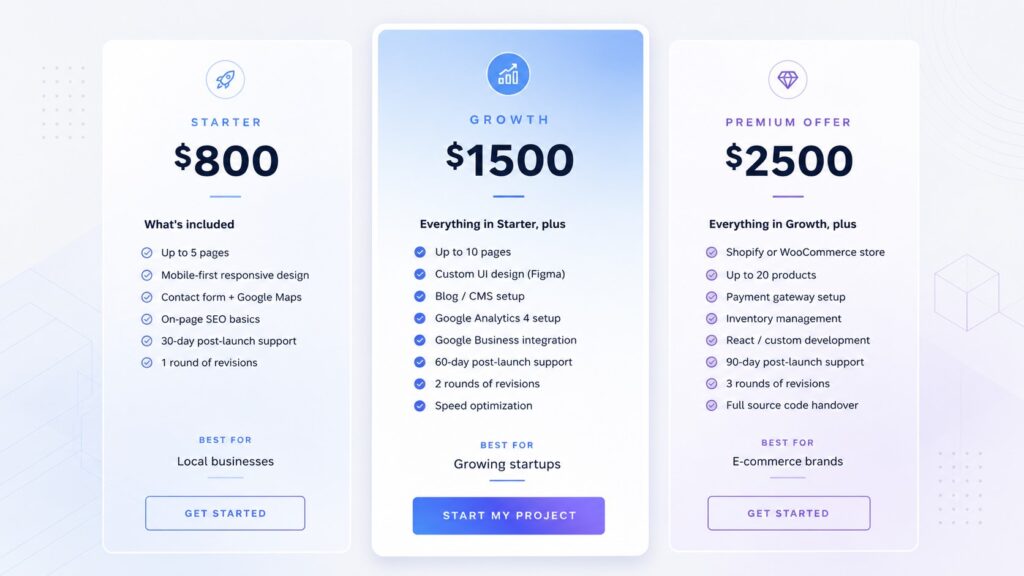
At $800 for Starter, $1,500 for Growth, and $2,500 for Premium, these plans are priced for businesses that are serious but not yet enterprise-level. You’re getting professional, mobile-first design with real deliverables at each tier without the agency markup that comes with a bigger name on the invoice.
The Business Stage Filter: Matching the Right Plan to Where You Are Right Now
This is the section that actually answers the question.
Stop comparing feature lists. Start thinking about your business stage. Here’s how the filter works in practice.
Stage One: You Need a Professional Online Presence (Starter, $800)
Who this is for: Local service businesses, consultants, trades, restaurants, or anyone who currently has no website, an outdated one, or a DIY build that isn’t doing the job.
What you get with the Starter plan: up to 5 pages, mobile-first responsive design, a contact form, Google Maps integration, basic on-page SEO, 30 days of post-launch support, and one round of revisions.
That’s a complete, professional website built to function. Nothing unnecessary. Nothing missing.
If your goal right now is to show up online, look credible, and make it easy for people to contact you, Starter is exactly right. You don’t need a blog yet. You don’t need custom animations. You need a clean, fast, professional site that works on every device. This does that.
Stage Two: You’re Growing and Need Your Website to Work Harder (Growth, $1,500)
Who this is for: Businesses that already have some online presence but know their current site isn’t pulling its weight. You’re generating leads or traffic, you want to track what’s happening, and you’re ready to invest in design that actually represents your brand.
The Growth plan adds: up to 10 pages, a custom UI design built in Figma (not a template), Blog/CMS setup, Google Analytics 4, Google Business Integration, 60 days of post-launch support, two rounds of revisions, and speed optimization.
Each of those additions is doing real work.
Figma-built custom UI means your site looks like you, not like a thousand other WordPress sites using the same theme. The Blog/CMS means you can publish content and build SEO over time without touching code. Google Analytics 4 means you know where your visitors are coming from and what they’re doing when they arrive. Google Business Integration means your hours, location, and reviews are properly connected to your site.
This is the plan for businesses ready to treat their website as a marketing asset.
Stage Three: You’re Ready to Sell Online or Scale (Premium, $2,500)
Who this is for: E-commerce brands, product businesses, or companies that need functionality beyond standard pages and content.
The Premium plan builds on everything in Growth and adds: Shopify or WooCommerce store setup, up to 20 products, payment gateway setup, inventory management, React or custom development, 90 days of post-launch support, three rounds of revisions, and full source code handover.
The full source code handover is worth calling out specifically. It means you own everything. No lock-in. No dependency on the agency to make basic changes. You take the keys when the project is done.
If you’re selling products, taking payments, or need functionality that standard page builders can’t deliver, Premium is where you need to be.
How to Know Which Plan Is Actually Right for You (5 Honest Questions)
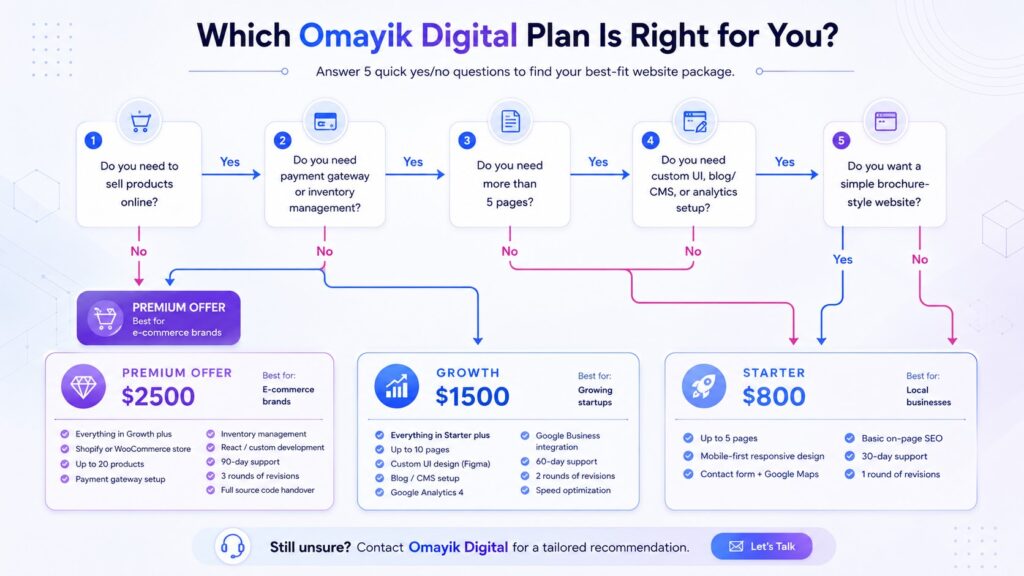
Still unsure? Work through these five questions honestly.
Which web design plan do I need?
5 quick questions. Get a plan recommendation matched to your business.
What best describes your business right now?
How many pages does your website actually need?
Do you need to sell products or take payments online?
How important is a unique visual design to your brand?
What level of support do you need after the site goes live?
Question 1: Do you need to sell products or take payments online?
If yes, you need the Premium plan. Payment gateway setup, inventory management, and WooCommerce or Shopify integration are Premium-only features. There’s no workaround for this.
Question 2: How many pages does your site actually need?
Count them out: Home, About, Services (or Products), Contact. That’s four. Add a Gallery or FAQ and you’re at six. If you’re under five pages, Starter covers you completely. If you’re between five and ten, Growth is your range. More than ten, or if you need a blog, Growth or Premium depending on Q1.
Question 3: Do you want to publish blog content or build SEO over time?
A Blog/CMS setup starts at the Growth plan. If content marketing is part of how you plan to grow over the next year, you need at least Growth. The Starter plan is a static site. Great for presence, not built for content volume.
Question 4: How important is a completely unique visual identity to your brand?
If you’re in a competitive market where design perception matters (hospitality, fashion, professional services, agencies), a template isn’t going to cut it. Custom Figma UI design starts at Growth. If your brand is the product, invest in the plan that treats it that way.
Question 5: What level of support do you need after the site goes live?
Starter includes 30 days. Growth gives you 60. Premium gives you 90. If your business is heavily dependent on its website (bookings, sales, lead generation), longer post-launch support is insurance, not a luxury.
Simple Pricing. No Surprises. Here’s Exactly What Omayik Digital Offers
Omayik Digital’s pricing philosophy is built into the tagline on their pricing page: simple pricing, no surprises. Every plan includes a dedicated project manager, mobile-first design, and on-time delivery guaranteed.
Here’s what that looks like in practice.
Starter Plan ($800): Everything You Need to Launch with Confidence
Up to 5 pages. Mobile-first responsive design. Contact form and Google Maps. On-page SEO basics. 30-day post-launch support. One round of revisions.
This is a complete professional website. Not a placeholder. Not a template someone dropped your logo into. A proper, functional site built to represent your business well and give you a foundation to build on.
Growth Plan ($1,500): Built for Businesses Ready to Scale Their Online Presence
Everything in Starter, plus: up to 10 pages, custom Figma UI design, Blog/CMS setup, Google Analytics 4, Google Business Integration, speed optimization, 60-day support, and two revision rounds.
This is where most growing businesses should be. It’s the plan that gives your website actual leverage in your marketing.
Premium Offer ($2,500): Full-Stack Web Presence for Serious Growth
Everything in Growth, plus: Shopify or WooCommerce store, up to 20 products, payment gateway, inventory management, React/custom development, 90-day support, three revision rounds, and full source code handover.
For businesses ready to transact online and own their digital infrastructure outright.
Ready to Build? Here’s What Happens Next
Getting started with Omayik Digital is straightforward.
You reach out, share what your business needs, and they’ll put together a quotation. That’s it. No lengthy discovery calls designed to upsell you. No vague proposals that take three weeks to arrive.
What the Process Looks Like from Day One
Once you’re on board, a dedicated project manager handles the coordination. You’re not passing messages between a designer and a developer and a project coordinator. One point of contact, start to finish.
The process runs: initial brief, design phase (with Figma mockups on Growth and Premium), development, review and revisions, and launch. Post-launch support kicks in the day your site goes live.
Your First Quotation Comes With a Special Discount
Omayik Digital is currently offering up to 50% off for new clients.
That means the Starter plan could come in significantly under $800. The Growth plan well under $1,500. This isn’t a permanent pricing structure; it’s a new client offer designed to make the first step easier.
If you’re reading this and thinking “I’ve been putting this off,” this is a good reason to stop doing that.
FAQ
How much does a professional web design package cost?
Professional web design typically ranges from $800 to $2,500 for small businesses, depending on pages, features, and custom development needs.
Budget options under $500 exist but usually cut corners on mobile design, SEO, and post-launch support. Investing in the $800 to $1,500 range tends to deliver far better long-term results for most growing businesses.
What is included in a web design package?
A solid web design package includes mobile-first responsive design, on-page SEO, a contact form, CMS setup, post-launch support, and at least one revision round.
Premium tiers add custom UI design, e-commerce functionality, Google Analytics 4, and extended support windows. Always confirm what’s included in writing before signing anything.
Which web design package is best for a small business?
For most small businesses, the Growth plan ($1,500 range) offers the best balance of professional design, SEO tools, and content capability without over-engineering the build.
If you’re just starting out with five pages or fewer, a Starter plan at $800 gives you everything you need to establish a credible online presence without paying for features you won’t use yet.
Is a $500 website good enough for a business?
A $500 website can work for extremely basic needs, but it almost always compromises on mobile responsiveness, SEO setup, speed, and post-launch support.
For a business that depends on its website to generate leads, bookings, or sales, the gap between a $500 build and an $800 professional build is significant. The cheap option often ends up costing more when you rebuild it 12 months later.
What is the difference between a website design package and a custom website?
A package is a defined scope at a fixed price. A custom website has no predefined limits and is built entirely from scratch for complex or unique requirements.
Packages deliver faster, at better value, and with predictable costs. Custom builds suit businesses with genuinely complex needs and larger budgets. For most small to mid-size businesses, a well-structured package from a team like Omayik Digital covers everything they actually need.
Leave a Reply