
Web Development Outsourcing: Benefits, Risks & How to Do It Right
If you’re reading this, you’ve probably already decided you need a new website or a rebuild, and now you’re stuck on the harder question: who actually builds it?
Outsourcing web development means hiring someone outside your company, a freelancer, an agency, or an offshore team, to design and build your site instead of doing it yourself or hiring an employee. Done well, it gets you a professional site faster and cheaper than building an in-house team from scratch. Done badly, it turns into missed deadlines, a site you don’t fully own, and a bill that keeps growing after launch.
Both outcomes are common. The difference usually comes down to how the engagement is set up, not who you hire. This guide walks through the real benefits, the real risks, and the specific things to check before you sign anything.
What Web Development Outsourcing Actually Means
Outsourcing web development covers a few different arrangements, and they carry very different levels of risk:
- Freelancers — individual developers or designers you hire directly, often through platforms or referrals. Lowest cost, but you’re relying on one person’s availability and skill set.
- Small to mid-size agencies — a team that handles design, development, and sometimes ongoing support as a package. Usually more reliable than a solo freelancer, with backup if someone’s out sick.
- Offshore or nearshore development shops — larger teams based in a different country, often at a lower hourly rate. Can be excellent, but time zone gaps and communication style differences add friction.
- DIY platforms — Wix, Squarespace, Shopify’s built-in tools. Technically not outsourcing, but worth mentioning since it’s the alternative a lot of business owners are actually comparing against.
None of these is universally “better.” A five-page brochure site for a local business has a different risk profile than a custom web app handling customer payments. The right choice depends on your project’s complexity, your budget, and how much hands-on management you want to do.
The Real Benefits of Outsourcing
Cost. Hiring a full-time in-house developer means salary, benefits, equipment, and management overhead, often more than the entire cost of an outsourced project. For most small businesses that need a website built once and maintained occasionally, outsourcing is simply the more rational spend.
Speed. An established agency or experienced freelancer has already solved the problems you’re about to run into. They’re not learning your CMS while building your site.
Access to specialized skills. You might need someone who’s built e-commerce checkouts before, or who knows how to integrate a specific CRM. Outsourcing lets you match the skill to the project instead of hoping your one in-house hire happens to know everything.
Scalability. You can scale the engagement up for a big launch and down afterward, without the fixed cost of a full-time salary sitting on your books year-round.
Focus. Every hour you’re not managing a developer is an hour back on running your actual business.

The Real Risks (and Why Most Articles Skip This Part)
This is where a lot of outsourcing guides get thin. Here’s what actually goes wrong:
Communication gaps. Vague instructions produce vague results. If you tell a developer “make it modern” without more direction, you’ll get their interpretation of modern, not yours.
Time zone friction. A 12-hour gap can turn a quick question into a two-day round trip. It’s manageable, but only if you plan for it upfront with a clear communication cadence.
Quality control. Not every developer tests thoroughly before handoff. Bugs that show up after launch, on mobile especially, are one of the most common complaints business owners have about outsourced projects.
Scope creep and hidden costs. “Small” requests add up. Without a defined scope of work, “just one more thing” clauses can quietly double your final bill.
IP and code ownership disputes. This one catches people off guard. If your contract doesn’t explicitly say you own the final code and all its components, you may not. Some vendors retain rights to reusable components or refuse to hand over source files until final payment, sometimes even after.
Security and data handling. If your site collects customer data, you need to know how the developer handles credentials, backups, and access during and after the build.
Vendor disappearance. Freelancers go quiet. Small agencies shut down. If there’s no backup plan for who maintains your site if your point of contact vanishes, you’re stuck.
None of these risks are reasons to avoid outsourcing. They’re reasons to structure the engagement so they can’t blindside you.
Freelancer vs. Agency vs. Offshore Dev Shop vs. DIY Builder
| Factor | Freelancer | Small Agency | Offshore Dev Shop | DIY Builder |
|---|---|---|---|---|
| Typical cost | Lowest | Moderate | Low to moderate | Lowest (subscription-based) |
| Speed | Varies by availability | Usually fastest for defined projects | Can be fast, but time zone delays add friction | Fast to start, slow to customize |
| Communication risk | Medium, depends on the person | Low, usually a dedicated point of contact | Higher, due to time zone and language gaps | None, but no expert guidance either |
| Quality control | Inconsistent, one person’s skill ceiling | Generally consistent, team-reviewed | Varies widely by vendor | Limited by the platform’s templates |
| Best fit for | Small, well-defined projects with a clear brief | Businesses that want a full-service build with support | Larger projects where cost savings justify the coordination effort | Very simple sites, minimal budget, no custom functionality needed |
Use this as a starting filter, not a final answer. A great freelancer with strong references can outperform a mediocre agency, and vice versa. The table tells you what to expect on average, not what you’ll definitely get.
How Much Should You Actually Budget?
Costs vary widely by scope, region, and vendor, so treat these as general ballpark ranges, not quotes:
- Simple brochure/informational site (5-10 pages, no custom functionality): often a few thousand dollars total, sometimes less depending on the vendor and platform.
- E-commerce site (product catalog, cart, payment integration): typically a noticeably higher range than a brochure site, since payment processing, inventory logic, and security requirements add real development time.
- Custom web application (logins, dashboards, custom backend logic): the widest range of all, since cost scales directly with feature complexity and can run well into five figures for anything substantial.
The biggest cost driver isn’t the number of pages, it’s custom functionality. A ten-page brochure site is cheap. A three-page site with a custom booking engine and payment processing is not.
If a quote seems dramatically lower than everyone else’s for the same scope, that’s worth asking about directly rather than assuming it’s a good deal.
How to Vet a Web Development Partner
Before you sign anything, work through this:
- Ask for a portfolio of comparable work. Not just any past projects, ones similar in scope and industry to yours.
- Contact at least one past client directly. A vendor that hesitates to connect you with a reference is telling you something.
- Confirm who owns the code and content after final payment. Get this in writing, not a verbal assurance.
- Ask about their revision policy. How many rounds of changes are included before extra charges kick in?
- Clarify post-launch support terms. What happens if something breaks in week three? Is that covered or billed separately?
- Ask how they communicate during the project. Weekly updates? A shared project management tool? Radio silence until the big reveal? You want to know this before you’re three weeks in.
- Get a written scope of work (SOW). This should list deliverables, timeline, revision limits, and payment milestones, not just a one-line description of “build me a website.”
- Ask about source code escrow for larger projects. For bigger, more complex builds, some businesses use a third-party escrow service to hold source code until conditions are met, which protects you if the vendor becomes unresponsive.
Red Flags to Watch For
- No written contract or scope of work, just a verbal agreement or a single email
- Pressure to pay 100% of the project cost upfront
- Vague or evasive answers about who owns the final code
- Unwillingness to provide any client references
- No clear timeline or milestone structure
- Communication that’s already inconsistent during the sales process (if they’re slow to respond now, that won’t improve after they have your deposit)
- Pricing that’s dramatically below every other quote you’ve gotten for the same scope, with no clear explanation why
If you notice two or more of these during initial conversations, treat it as a serious signal, not a minor inconvenience to work around.
In-House vs. Outsourced vs. DIY: Which Fits Your Situation?
Choose in-house hiring if: you have ongoing, complex development needs that will continue well beyond the initial build, and the workload justifies a full-time salary.
Choose outsourcing if: you need a professional result without carrying a full-time employee, your project has a defined scope and end point, and you’re willing to invest time upfront in vetting and setting clear expectations.
Choose a DIY builder if: your needs are simple, your budget is very limited, and you don’t need custom functionality beyond what a template platform offers out of the box.
For most small businesses and startups building their first serious website, outsourcing to a small agency or a well-vetted freelancer hits the best balance of cost, speed, and quality, provided the engagement is structured properly from the start.

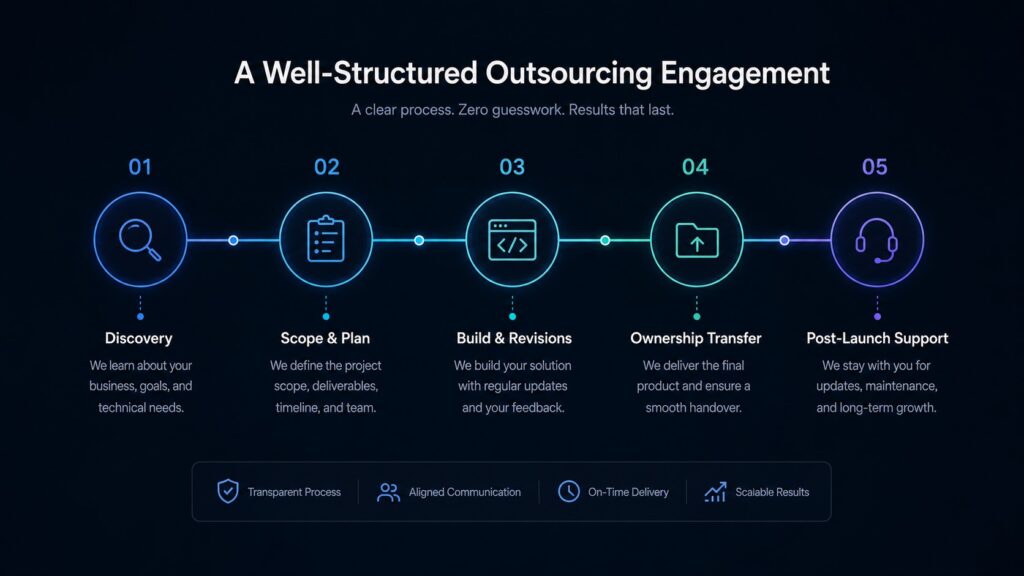
What a Well-Structured Outsourcing Engagement Looks Like
The mechanics matter more than who you hire. A solid engagement typically includes:
- A discovery conversation where the vendor asks about your business and goals, not just your design preferences
- A written scope of work with a defined timeline and fixed or clearly-explained pricing
- A set number of revision rounds specified upfront
- Clear terms on code ownership, transferred to you on final payment
- A defined post-launch support window, so you’re not left stranded the day after launch
Omayik Digital’s process, for example, follows a fixed 7-day build timeline with a defined discovery call, one round of revisions, and 30 days of post-launch support built into the engagement. It’s a useful reference point for what “clearly structured” actually looks like in practice, regardless of which vendor you end up choosing.
The Bottom Line
Outsourcing web development isn’t inherently risky or inherently safe. It’s a business arrangement, and like any arrangement, the outcome depends on how clearly you define expectations before work begins. Vet the vendor, get the scope and ownership terms in writing, and set a clear communication cadence. Do that, and outsourcing is one of the most efficient ways for a small business to get a professional website without the overhead of a full-time hire.
If you’re currently comparing outsourcing options and want a second opinion on a quote you’ve received, or want to see what a transparently structured project looks like, Omayik Digital offers a free 30-minute discovery call with no obligation. You can also browse past project examples or check current pricing to compare against other quotes you’re evaluating.
Leave a Reply