
Progressive Web App Development: Costs, Benefits & How to Pick the Right Team
If you’re trying to figure out whether your business needs a Progressive Web App (most people call it a PWA), you’ve probably run into a lot of confusing tech talk. This guide skips that. We’ll explain what a PWA actually is, what it costs, what you get out of it, and what to look for when you hire someone to build one.
What Is a Progressive Web App?
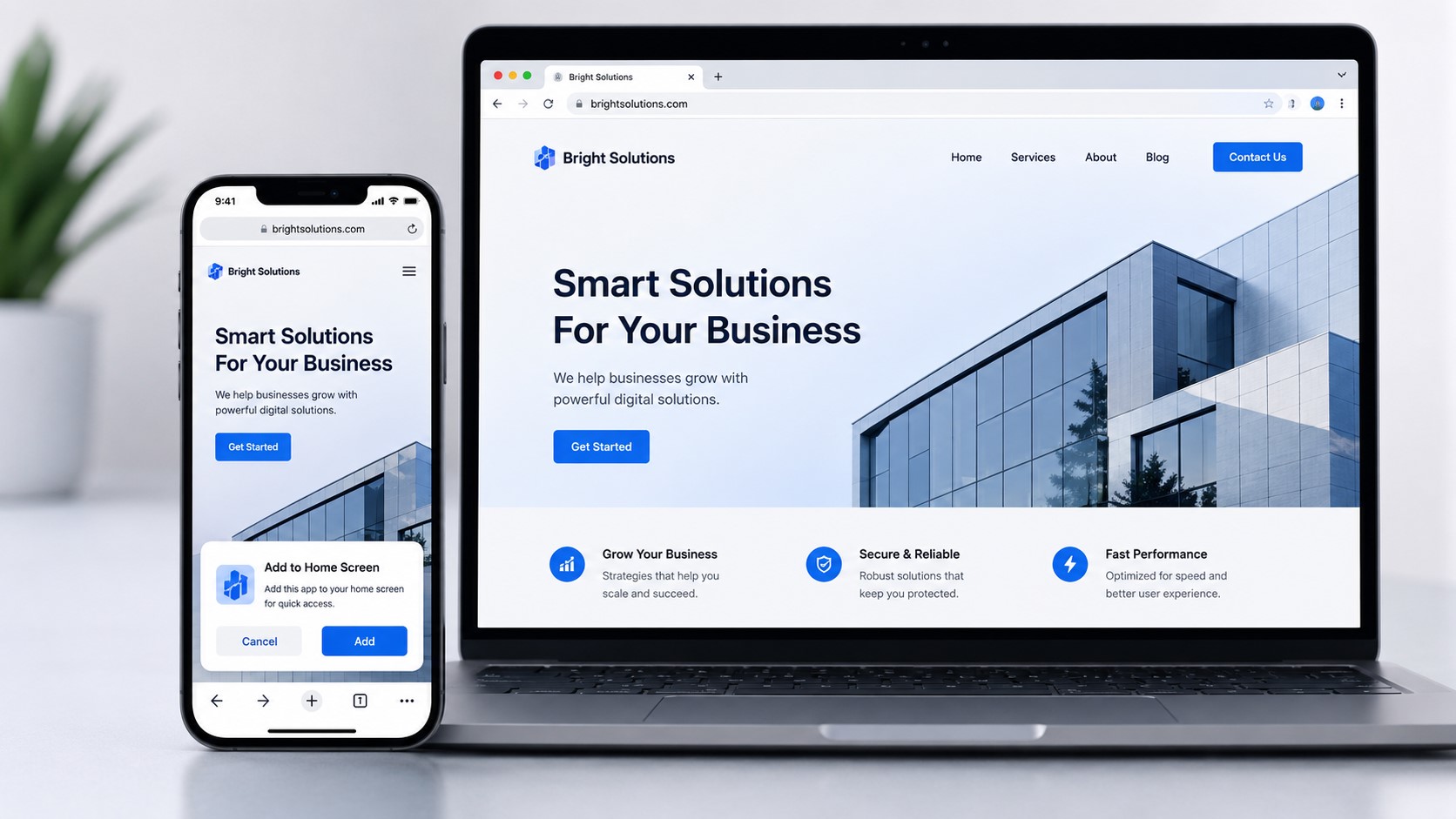
A Progressive Web App is a website that acts like an app.
You open it in a browser, like Chrome or Safari, just like any other website. But it can also do things that used to be only for apps you download from the App Store or Google Play. A PWA can:
- Show up as an icon on your phone’s home screen
- Work even when the internet connection is spotty or gone
- Send push notifications, like a text message
- Load fast, almost instantly, on repeat visits
Think of it as a website that got an upgrade. You’re not building something totally separate from your website. You’re adding a few key features on top of it.
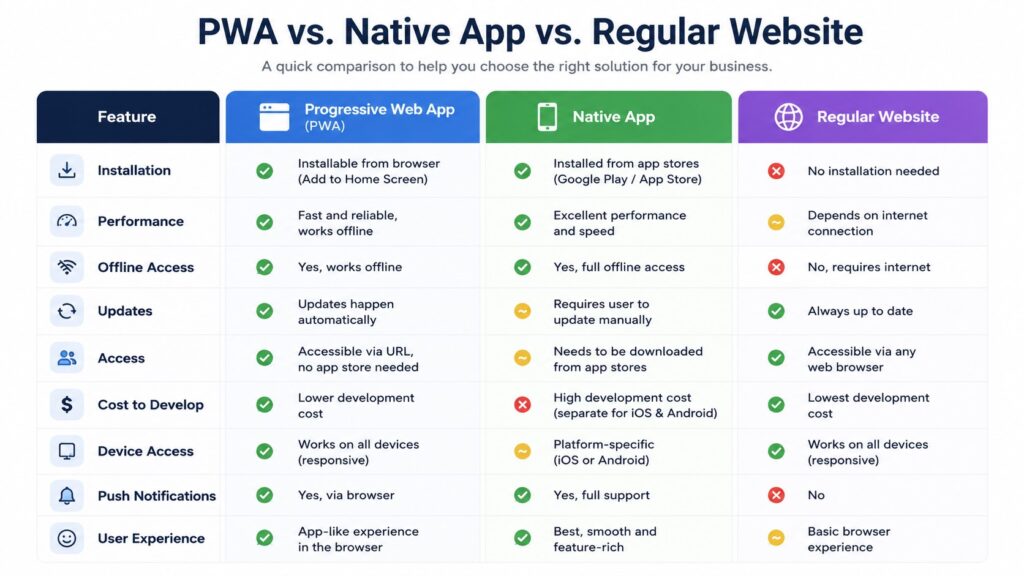
PWA vs. Native App vs. Regular Website
This is where a lot of people get stuck, so let’s break it down plainly.
| Feature | Regular Website | Progressive Web App | Native App |
|---|---|---|---|
| Found through search engines | Yes | Yes | No |
| Works without internet | No | Yes (partially) | Yes |
| Installed on home screen | No | Yes | Yes |
| Listed in App Store / Google Play | No | Usually no | Yes |
| Push notifications | No | Yes (mostly on Android) | Yes |
| Cost to build | Lowest | Medium | Highest |
| Best for | Simple info sites | Businesses wanting app-like features without app store hassle | Apps needing deep phone features (camera, GPS, Bluetooth) |
Here’s the short version: if your business wants people to visit often, get notifications, and use the site offline, without paying for two separate apps (one for iPhone, one for Android), a PWA is often the smart middle ground.
If you need something that uses advanced phone hardware, like Bluetooth connections or heavy background location tracking, a native app usually makes more sense.
How Much Does a Progressive Web App Cost?
This is usually the first question, so let’s answer it early.
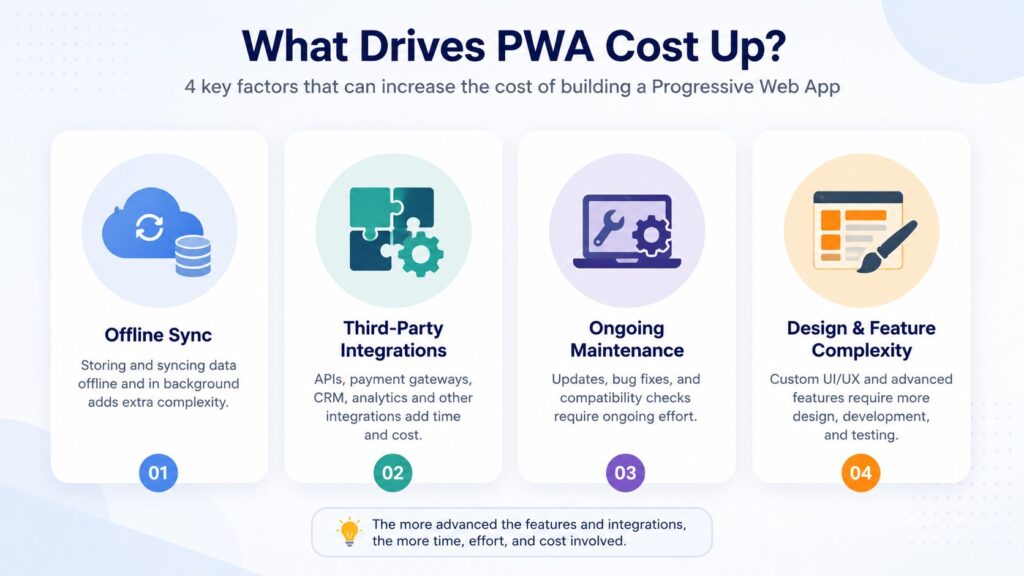
The cost of a PWA depends mostly on how complex the features are, not just how many pages the site has. Here’s a general breakdown of what tends to drive the price:
Basic PWA A simple site with offline access, a home screen icon, and fast loading. Think of this as adding “PWA features” onto a straightforward business website.
Mid-complexity PWA Adds things like user accounts, push notifications, a shopping cart, or booking systems. More moving parts means more development time.
Advanced PWA Custom offline data syncing (like letting someone fill out a form with no internet, then automatically saving it once they’re back online), heavy third-party integrations (payment systems, CRMs, inventory software), or complex animations and interactions.
A few things that quietly push the price up:
- Custom offline functionality (this is usually the biggest cost driver, more than people expect)
- Connecting to other software you already use
- Ongoing maintenance and updates after launch
- Design complexity (lots of custom animations, layouts, or branding work)
If an agency gives you one flat number without asking about any of this, ask what’s actually included. Fixed pricing is great, but only when the scope is clear upfront.
The Real Benefits of a Progressive Web App
Let’s go past the buzzwords and talk about what actually helps a business.
People don’t lose you when their internet drops. If someone is looking at your menu, your services, or your product list and their signal cuts out, a PWA can still show them what they already loaded. A regular site just goes blank.
It gets added to their phone without an app store. No app store approval process, no waiting days for a native app update to go live. Someone taps “Add to Home Screen” and it’s there.
It loads fast, especially on the second visit. PWAs are built to cache information, meaning your site remembers what it showed someone last time and loads it quicker.
You reach both iPhone and Android users with one build. Instead of paying to build and maintain two separate native apps, you build one PWA that works across both, with some limits (we’ll get to that next).
Push notifications keep people coming back. A reminder about an appointment, a sale, or new content can bring someone back without needing their phone number or email.
The Honest Downsides Nobody Talks About
Most articles skip this part. We won’t.
Apple limits what PWAs can do on iPhones. Safari on iOS supports PWAs, but with real restrictions. Push notifications on iPhone only became available in more recent versions of iOS, and even then, they don’t work exactly the same way they do on Android. If a big part of your plan depends on iPhone push notifications, talk to your developer about what’s actually possible right now, since Apple changes these rules over time.
They’re not in the App Store or Google Play by default. If your business depends on people discovering you by browsing an app store, a PWA won’t show up there the same way a native app would.
Some advanced phone features aren’t available. Things like Bluetooth connections, certain camera controls, or deep background processing are usually better handled by a native app.
People still need to know to “install” it. Since there’s no app store prompt, you’ll need to actively invite people to add it to their home screen, usually through a small banner or message on your site.
None of this means a PWA is a bad choice. It just means it’s the right choice for some businesses and not others, and being upfront about that is what separates a good recommendation from a sales pitch.
Which One Should Your Business Choose?
Ask yourself these questions:
- Do most of your customers browse on their phone? If yes, a PWA’s offline access and home screen install become more valuable.
- Do you need push notifications on iPhone specifically? If this is critical, check current iOS support carefully before committing, since it’s more limited than Android.
- Do you need access to advanced phone hardware, like Bluetooth, deep GPS tracking, or offline maps? A native app is usually the better fit.
- Is budget a big factor? A PWA is typically less expensive than building two separate native apps.
- Do you mainly need a fast, professional website with some app-like extras? A PWA covers this well, without the cost of app store development and approval.
How Long Does It Take to Build One?
Timelines depend on complexity, the same way cost does. A basic PWA with core offline features and a clean design can move quickly. Anything involving custom integrations, user accounts, or complex offline data syncing takes longer, simply because there’s more to build and test properly, especially testing on real iPhones and Android phones, not just a simulator.
A good agency should be able to give you a realistic week-by-week breakdown before the project starts, not just a single end date.
What to Look for When Choosing a PWA Development Agency
Since a lot of businesses searching this topic are also trying to figure out who to hire, here’s a practical checklist.
Ask to see real, live examples of their work. Not just screenshots. Ask for a link you can actually click and test on your own phone.
Ask if they test on real iOS devices, not just Android. Because of Apple’s stricter PWA rules, testing only on Android can miss real problems that show up on iPhone.
Ask what happens after launch. Bugs happen. Phones update. Ask what support looks like in the weeks after your site goes live, and whether that’s included or billed separately.
Ask how pricing works. Fixed price with a clear scope is usually easier to plan around than hourly billing with no cap. Just make sure you understand exactly what’s included in that fixed number.
Ask about timeline transparency. A trustworthy team will walk you through what happens week by week, not just hand you a single delivery date.
Ask who owns the code and the site after it’s built. You want to be sure you’re not locked into that one agency forever if you ever want to switch.
How Omayik Digital Approaches This
At Omayik Digital, the process is built around clarity from day one. You start with a free discovery call, get a fixed price with no hidden fees, and know upfront what you’re getting and when. Projects move fast, with new sites typically live within about a week, and you get 30 days of support after launch to catch anything that needs adjusting.
If you’re weighing whether a PWA fits your business, you can see examples of past work, check out pricing details, or look through the full list of services offered.
Bottom Line
A Progressive Web App is a smart option for a lot of small businesses and startups, especially ones that want fast performance, offline access, and an app-like feel without the cost of building two separate native apps. It’s not perfect for everyone. If you need deep phone hardware access or heavy app store visibility, a native app might serve you better.
The best next step is a real conversation about what your business actually needs, not a generic recommendation. If you want to talk through your specific situation, you can reach out here for a free discovery call.
Leave a Reply