
API Integration Services: Connect Your Apps & Automate Workflows
If you run a small business, chances are you’re already juggling a handful of software tools that don’t talk to each other. Your website collects leads in one place. Your CRM lives somewhere else. Your invoicing tool has no idea a new customer just signed up. Someone on your team is probably copying information from one screen to another right now.
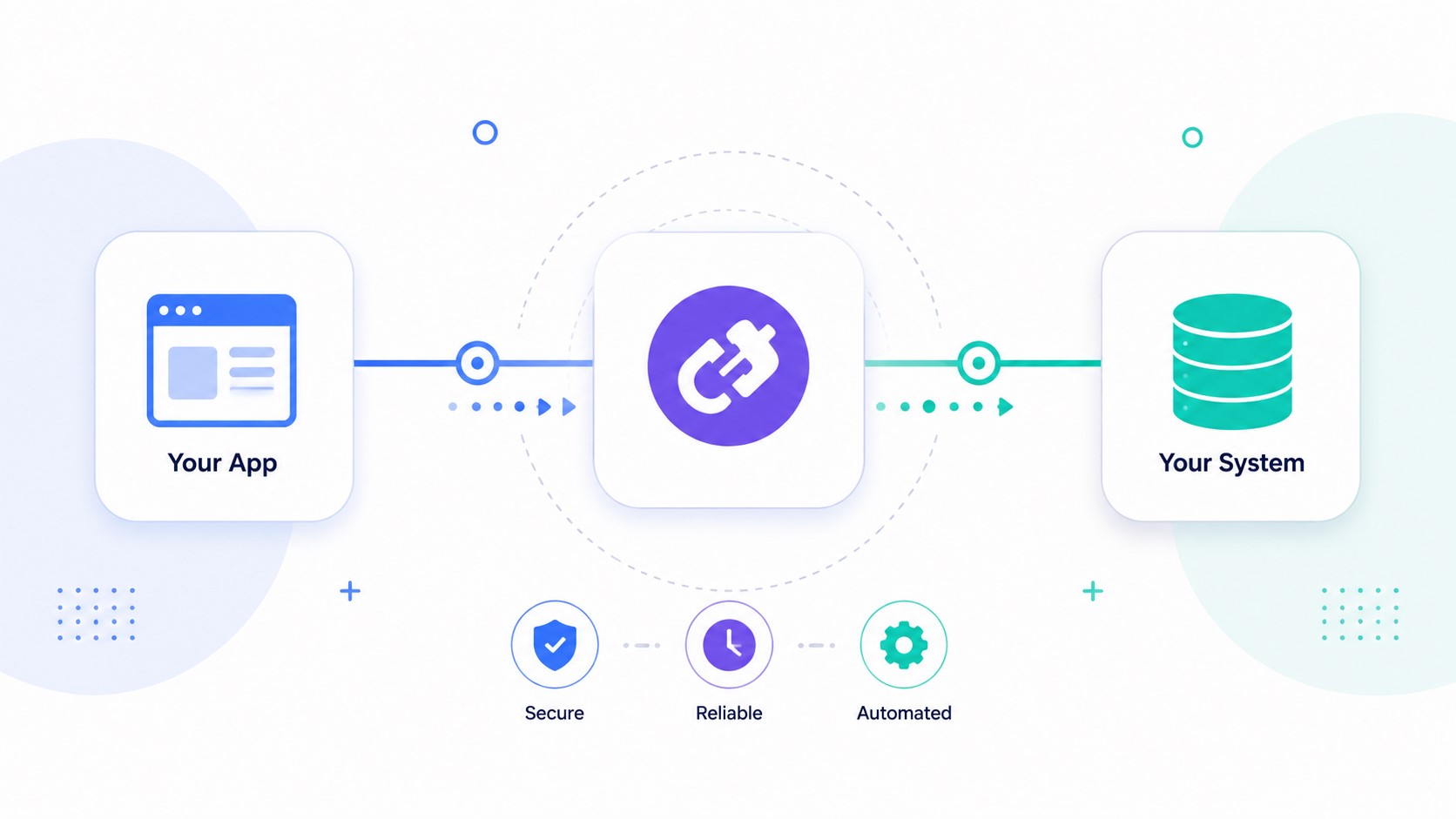
API integration is how you fix that. In plain terms, it’s the process of connecting two or more pieces of software so they can automatically share data and trigger actions in each other, without a person manually moving information between them.
This article walks through what API integration actually means, how it’s different from the no-code automation tools you’ve probably heard of, when you genuinely need custom integration work versus when you don’t, and what the process and cost typically look like.
Get in touch: https://omayikdigital.com/contact-us/
What Is API Integration, Exactly?
An API, or Application Programming Interface, is essentially a defined set of rules that lets two pieces of software communicate. Think of it like a waiter taking your order to the kitchen: you don’t need to know how the kitchen works, you just need a reliable way to place your order and get your food back. The API is that reliable, structured channel between two systems.
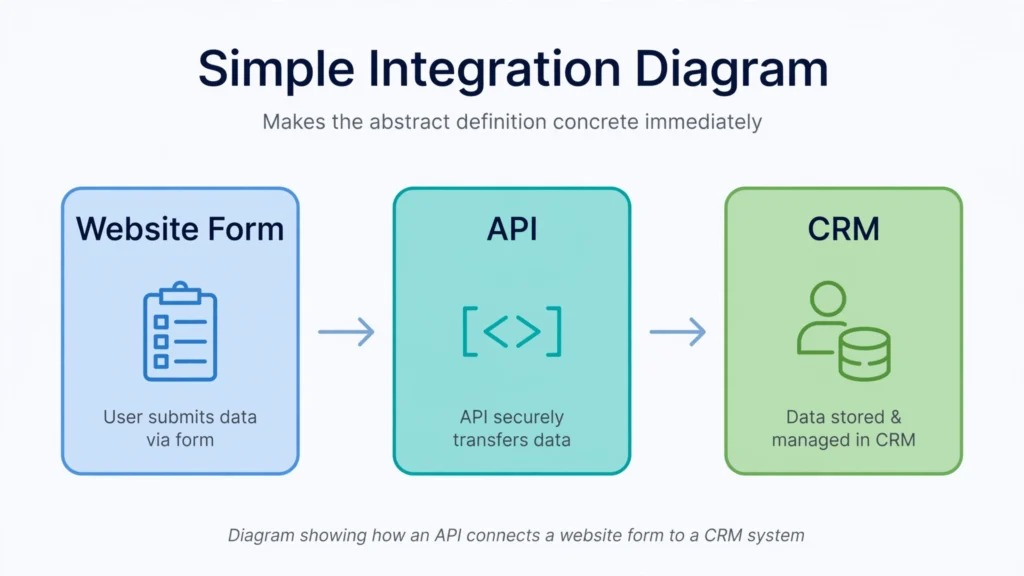
API integration is the work of connecting your specific tools through their APIs so that data flows automatically. A new form submission on your website can create a contact in your CRM. A completed booking can trigger a confirmation email and a calendar entry. A new sale in your e-commerce platform can update your inventory system in real time.
The most common technical approach today is a REST API, a widely used style of API that lets systems exchange data over the web using standard, predictable requests. Many integrations are also powered by webhooks, which are essentially automatic notifications one system sends to another the instant something happens (a new order, a form submission, a status change), rather than one system having to constantly check in and ask “did anything happen yet?”
API Integration vs. No-Code Tools: What’s the Difference?
If you’ve looked into this before, you’ve probably come across tools like Zapier or Make (formerly Integromat). These are no-code automation platforms that let you connect apps through a visual interface, often without writing any code at all.
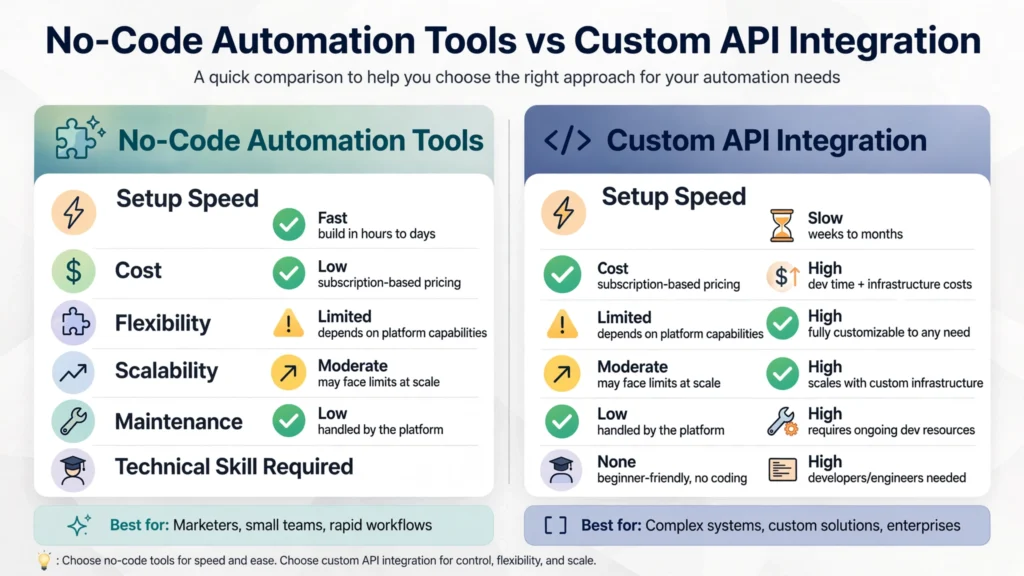
Here’s the honest answer: for a lot of small businesses, a no-code tool is genuinely the right call. It’s faster to set up, cheaper, and doesn’t require ongoing developer support for simple, low-volume workflows.
Custom API integration becomes worth it when your needs go beyond what these platforms handle well: high volumes of data, real-time syncing requirements, connecting tools that don’t have a native no-code connector, or workflows involving complex logic that a drag-and-drop builder can’t express cleanly.
| No-Code Automation (Zapier, Make) | Custom API Integration | |
|---|---|---|
| Setup speed | Fast, often same-day | Slower, involves planning and development |
| Upfront cost | Low, subscription-based | Higher, project-based |
| Flexibility | Limited to what the platform supports | Can handle nearly any workflow or logic |
| Best for | Simple, low-volume, standard app connections | Complex logic, high volume, non-standard or proprietary systems |
| Ongoing cost | Monthly subscription fee | Occasional maintenance as connected apps change |
| Data control | Data passes through a third-party platform | Data can move directly between your own systems |
Neither option is inherently better. It comes down to what you’re trying to connect and how complex the workflow is.
Do You Need Custom API Integration? A Quick Framework
Ask yourself these questions:
How many systems are involved, and are they mainstream? If you’re connecting two popular tools that already have a native integration or a well-supported no-code connector, you probably don’t need custom work.
Does the connection need to be real-time? No-code tools often check for updates on a delay (sometimes 5 to 15 minutes depending on your plan). If your business needs instant syncing, like a live inventory count during checkout, custom work using webhooks is usually the more reliable route.
How complex is the data mapping? If you’re just passing a name and email from a form to a CRM, that’s simple. If you need to transform, filter, combine, or conditionally route data between systems, that complexity often outgrows a visual builder.
Does one of your tools lack a public API or connector? Some proprietary, older, or highly specialized software doesn’t have the kind of open API that no-code platforms rely on. In that case, custom integration (sometimes working directly with a vendor’s documentation) may be the only option.
What’s your volume? No-code platforms often price based on the number of tasks or operations per month. If you’re processing thousands of records, the cost of a no-code plan can climb quickly, and a custom-built integration may end up cheaper over time.
If most of your answers point toward simple, low-volume, and mainstream, a no-code tool is probably a fine starting point. If you’re hitting real limits on speed, complexity, or volume, that’s when custom integration work starts to pay for itself.
What Workflows Can API Integration Automate?
A few common examples, all built on the same underlying idea of two systems automatically exchanging data:
- Lead capture to CRM. A form submission on your website automatically creates or updates a contact record, so no lead sits in an inbox waiting to be manually entered.
- Booking and scheduling sync. An appointment booked online is pushed directly into your calendar and triggers a confirmation message, with no manual back-and-forth.
- E-commerce and inventory. A sale on your online store updates your inventory count and notifies your fulfillment process automatically.
- Payments and invoicing. A completed transaction in your payment processor generates an invoice or updates a customer’s billing record without anyone re-typing numbers.
- AI chatbot and voice agent workflows. When a chatbot or voice agent qualifies a lead or books an appointment, an integration is what pushes that information into your CRM or calendar in the background, which is part of what makes those tools actually useful rather than just a novelty on your site.
What the Process Actually Looks Like
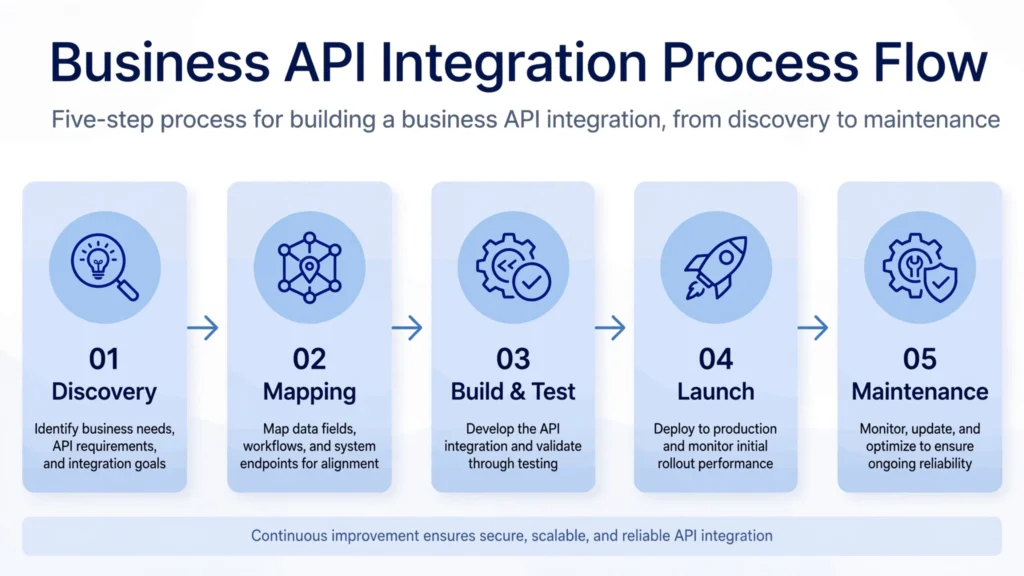
For a business owner who isn’t technical, here’s roughly what an integration project involves, regardless of who builds it:
1. Discovery. Someone maps out which systems need to talk to each other, what data needs to move, and how often. This is also where you figure out whether you actually need a custom build or whether a no-code tool would do the job.
2. Mapping the data flow. This is the planning stage: deciding exactly what triggers the integration (a new form entry, a completed sale, a status change) and what should happen as a result in the connected system.
3. Building and testing. The integration gets built and tested with real data, not just a sample record, to catch edge cases like missing fields, duplicate entries, or unusual formatting before it goes live.
4. Going live and monitoring. Once it’s working, the integration runs in the background. A good provider will also check in after launch to confirm everything is behaving as expected under real usage.
5. Ongoing maintenance. This part often gets overlooked. APIs change. A vendor updates their platform, deprecates an old endpoint, or changes their authentication requirements, and an integration that worked fine for months can suddenly break. Ask upfront who’s responsible for catching and fixing that.
What Does API Integration Typically Cost?
Pricing varies a lot depending on scope, so treat this as a guide to the factors involved rather than a fixed number. The main cost drivers are:
- Number of systems connected. Two systems is simpler than five.
- Complexity of the data mapping. Passing a name and email is cheap. Transforming, filtering, or conditionally routing data across multiple fields costs more.
- Real-time vs. batch syncing. Real-time, webhook-based integrations generally take more setup work than periodic batch syncs.
- Custom vs. well-documented APIs. If a system has clear, modern API documentation, integration is faster. Older or poorly documented systems take longer to work with.
- Ongoing maintenance needs. Some providers include a maintenance window after launch; others charge separately for updates when a connected app changes.
If you’re getting quotes, ask specifically what’s included: is it a one-time build, or does it come with support if something breaks down the line?
Common Pitfalls to Watch For
Relying on unofficial workarounds. If a “connector” is scraping data instead of using an official API, it’s fragile and can break without warning, sometimes without any notice from the tool that built it.
Ignoring what happens when a connected app updates. Software vendors change their APIs. A solid integration should be built with monitoring in place so you find out about a break before your customers do, not after.
Skipping proper authentication. Integrations should use secure methods like API keys or OAuth, a standard that lets two systems verify each other without you having to hand over your actual login credentials. Avoid any setup that asks you to share a password directly.
Not testing with real volume. An integration that works fine with 5 test records can behave very differently at 5,000. Rate limits (caps some APIs place on how many requests you can make in a given time) can also cause failures under real-world load if they weren’t accounted for during the build.
Assuming “connected” means “done.” An integration that isn’t monitored is one bad update away from silently failing. Ask whether ongoing checks are part of the deal.
A Quick Checklist Before You Hire Anyone
- Do they ask about your actual workflow, not just which tools you use?
- Can they explain, in plain language, whether you need custom work or a no-code tool?
- Do they use official APIs and secure authentication, not scraping or shared passwords?
- Is there a plan for what happens if a connected app changes its API later?
- Do they test with realistic data volume before calling it done?
- Is ongoing maintenance included, or is it a separate conversation?
Where This Fits at Omayik Digital
At Omayik Digital, API integration work usually shows up as part of a bigger project rather than a standalone service. When we build a website, an AI chatbot, or a CRM and marketing automation setup, the value depends on those pieces actually talking to each other. A chatbot that qualifies a lead is only useful if that lead lands in your CRM automatically. A booking form is only useful if it actually books the appointment on your calendar.
Some of that connective work shows up in projects like the LegalCase Record System in our portfolio, where getting data moving cleanly between systems is part of what makes the tool functional for the people using it day to day.
If your business is dealing with disconnected tools and manual data entry, the first step is usually a short conversation about what you’re actually trying to connect and how complex that really is. You can book a free 30-minute discovery call and we’ll walk through it together and tell you honestly whether you need a custom integration or whether a simpler tool will do the job just as well.
Frequently Asked Questions
Is API integration the same as using Zapier? Not exactly. Zapier is a no-code platform that often uses APIs behind the scenes to connect apps for you. Custom API integration means building a direct connection tailored to your specific systems and workflow, which becomes worth it when your needs go beyond what a no-code platform supports.
How long does an API integration project usually take? It depends entirely on scope. A simple connection between two well-documented systems can take days. A complex integration involving multiple systems, custom data logic, or older software with limited documentation can take weeks.
Do I need a developer to set up API integration? For simple connections between mainstream apps, no-code tools often don’t require any coding. For custom work, especially anything involving complex logic, high data volume, or non-standard systems, you’ll typically need someone with development experience.
What happens if a connected app changes its API? The integration can break, sometimes without warning. This is why ongoing monitoring matters, and it’s worth asking any provider upfront whether that’s included or billed separately.
Is my data safe when I connect two systems through an API? When it’s set up properly, using secure authentication like API keys or OAuth rather than shared passwords, yes. The bigger risk usually isn’t the API itself, it’s a poorly built integration that doesn’t handle authentication or error cases correctly.
Leave a Reply