
Wix vs WordPress vs Custom Build: Which One Is Right for Your Small Business?
Picking a website platform is not just a design decision.
It affects how well your site ranks on Google. It affects what an agency can do for you later. It affects how much you’ll spend every month, and whether you’ll have to rebuild everything in two years because you outgrew your platform.
Most comparison articles skip all of that. They tell you Wix is “easy” and WordPress is “powerful” and call it a day. That is not helpful if you are trying to make a real business decision.
This article breaks down all three options honestly: Wix, WordPress, and a fully custom-built site. By the end, you will know which one fits your situation and why.
👉 Get started with Hostinger here
First, What Are We Actually Comparing?
Wix is a website builder. You sign up, pick a template, drag things around, and publish. Hosting, security, and the platform itself are all bundled into one monthly fee.
WordPress (specifically WordPress.org) is free, open-source software you install on your own hosting account. It powers around 43% of all websites on the internet, including major media companies and millions of small businesses. You own your site completely.
A custom-built website means a developer or agency builds your site from scratch, usually in HTML/CSS/JavaScript or a framework like React or Next.js. No templates. No platform restrictions. Just code written specifically for your business.
Each one is genuinely good for different things. The problem is when businesses end up on the wrong platform for their needs.
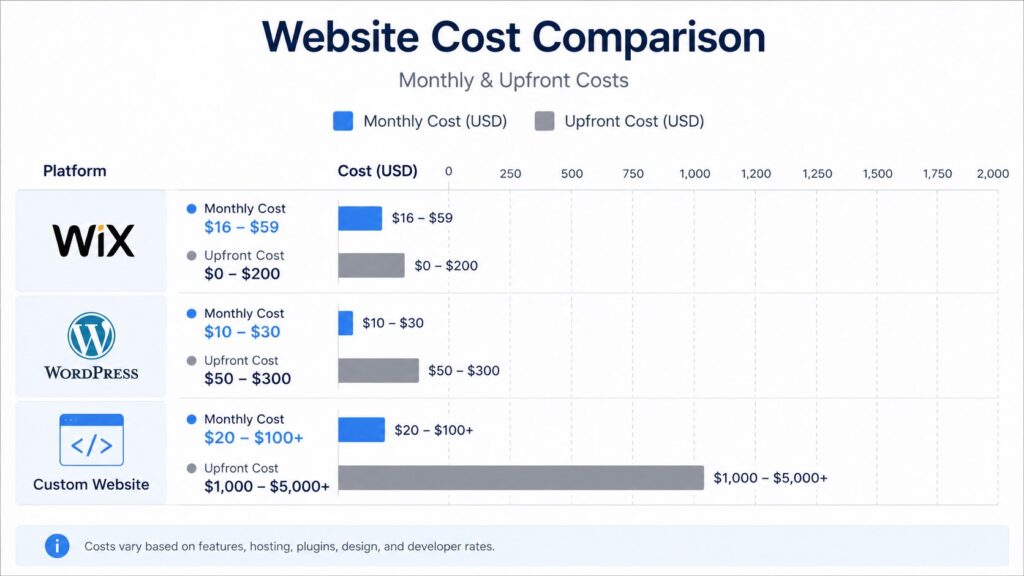
How Much Does Each One Actually Cost?
Cost is usually the first question. Here is what each platform realistically runs in 2026.
Wix
Wix’s paid plans start around $17 per month and go up to about $59 per month for business plans that include eCommerce tools. The free plan is not usable for a real business because it puts Wix ads on your site and gives you a Wix subdomain instead of your own domain.
Most small businesses end up spending $27 to $49 per month on Wix, plus extra for third-party apps that add features like advanced booking forms or membership tools. Those apps are often separate monthly charges on top of your plan.
Over three years, a Wix site can cost $1,000 to $1,800 just in platform fees. And if you ever want to leave Wix, you cannot take your site with you. You start over.
WordPress
WordPress itself is free. What you pay for is hosting.
A good shared hosting plan from a provider like Hostinger starts at a few dollars per month, which makes it one of the most affordable ways to run a WordPress site. For a small business that does not expect massive traffic right away, shared hosting is perfectly fine to start.
Add in a premium theme ($60 to $200 one-time) and a few essential plugins, and most small businesses can get a professional WordPress site running for under $200 in the first year, plus $3 to $15 per month in hosting costs.
If you hire an agency or developer to build it for you, expect to pay $1,500 to $5,000 for a quality small business site. That is a one-time cost. After that, ongoing expenses are mostly just hosting.
👉 Get started with Hostinger here
Custom Build
A fully custom-built site is in a different price range. Development alone typically runs $10,000 to $50,000 or more, depending on what you need. Annual hosting and maintenance can add another $1,200 to $6,000 per year.
For most small businesses, a custom build is overkill. But for businesses with very specific technical needs, high traffic expectations, or features that no plugin can replicate, it can be the right call.
SEO: Which Platform Gives You the Best Shot at Ranking?
This section matters more than most people realize, because your platform choice affects not just whether you can optimize your site, but how much control you actually have over the technical stuff Google cares about.
Wix and SEO
Wix’s reputation for being bad at SEO used to be well-deserved. That has changed. In recent years, Wix has added solid built-in SEO tools including meta tag control, alt text fields, XML sitemaps, and structured data. For basic sites, Wix is no longer a dealbreaker from an SEO standpoint.
But Wix still has limits. You cannot fully control your site’s technical structure. If you need server-side rendering, custom schema markup, or advanced speed optimization, Wix makes those things harder or impossible. For local SEO and simple business sites, Wix is adequate. For businesses trying to rank in competitive markets, it often falls short.
WordPress and SEO
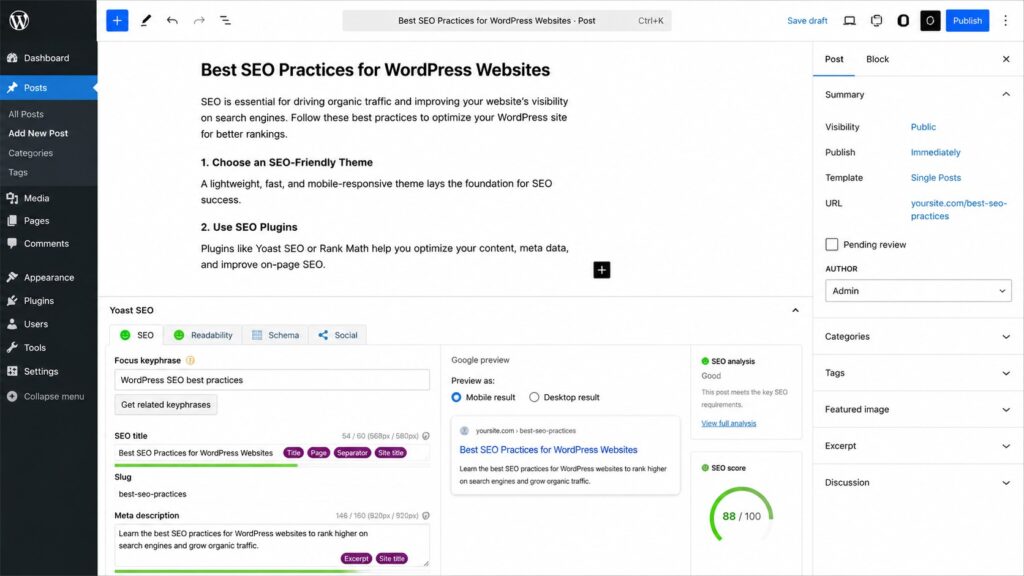
WordPress is built for SEO. With plugins like Yoast SEO or Rank Math, you get full control over your titles, meta descriptions, sitemaps, canonical tags, redirects, and more. You can control how your site loads, how images are served, and how your pages are structured.
The bigger advantage is that WordPress runs on your own hosting, which means you can choose performance-optimized hosting, use a CDN, and configure caching the way you want. That gives you real control over the technical factors Google weighs more every year: load speed, visual stability, and responsiveness.
For small businesses that want to grow through search, WordPress is consistently the stronger long-term platform.
Custom Sites and SEO
A well-built custom site can technically outperform both Wix and WordPress on speed and technical SEO. Custom code means no bloat from plugins or page builders. Pages can be lean and fast.
The catch is cost and flexibility. Custom sites are expensive to update and usually require a developer for even small changes. If your SEO strategy involves frequent content publishing (which it should), a custom site makes that much harder without a CMS layered on top.
Ease of Use: Who Actually Has to Manage This Thing?
This is an underrated factor. The right platform depends partly on who is running your website day-to-day.
Wix is the easiest to use out of the box. If you have no technical background and you want to update your site without touching any settings or files, Wix is genuinely simple. Everything is visual. There is built-in customer support.
WordPress has a learning curve. It is not hard, but it does require some familiarity. You need to understand the difference between themes and plugins. You need to know how to update things. If something breaks, you either fix it yourself or call someone who can. The upside is that once you learn it, WordPress gives you a lot more control.
Custom sites are maintained by developers. If you are not technical, plan to have an ongoing relationship with whoever built your site. Simple content updates can require developer time and cost money.
Scalability: What Happens as Your Business Grows?
Wix has real limits. As your business grows and you need more features, more pages, or more integrations, Wix can become a ceiling. Many businesses that start on Wix eventually have to migrate to a different platform, which means rebuilding from scratch. That migration costs time and money.
WordPress scales well. You can start with a simple 5-page site and grow it into a full content hub, membership platform, or eCommerce store without changing platforms. Plugins and custom development let you add almost any functionality you need.
Custom builds scale best of all in terms of performance at high traffic or complexity, but the cost of adding features is always high because everything requires developer work.
What Happens When You Work With an Agency?
This is something most comparison articles never mention, but it is very relevant if you plan to work with a web design agency at some point.
Most professional agencies build on WordPress. It is the standard for a reason. When you hand your site to an agency, they can work in the codebase directly, add custom functionality, optimize performance, and integrate third-party tools without fighting the platform.
Wix limits what agencies can do. Because Wix is a closed system, an agency cannot access your site the same way. Advanced customizations require working within Wix’s proprietary editor, which has more restrictions than a standard WordPress installation.
Custom sites built by another agency can be even harder to hand off. If the original developer used a unique stack or undocumented code, the next agency has to spend time just understanding what was already built before they can change anything.
If you want the most flexibility in who you work with and what your site can do, WordPress gives you the best options.
A Comparison at a Glance
| Wix | WordPress | Custom Build | |
|---|---|---|---|
| Starting cost | $17–$59/mo | $3–$15/mo hosting | $10,000–$50,000+ |
| Ease of use | Very easy | Moderate | Requires developer |
| SEO control | Good for basics | Excellent | Excellent |
| Flexibility | Limited | Very high | Maximum |
| Scalability | Limited | High | Very high |
| You own the site | No | Yes | Yes |
| Agency compatibility | Limited | Standard | Varies |
So Which One Should You Choose?
Here is the honest answer, based on where most small businesses actually land.
Choose Wix if: You are a solo operator or very small business, you just need a simple online presence, and you want to manage everything yourself with no technical help. It is a legitimate choice for this use case.
Choose WordPress if: You are serious about SEO and long-term growth, you want to own your site completely, you plan to publish content, or you think you might work with a web agency at some point. WordPress is the right call for the vast majority of small businesses.
Choose a custom build if: You have a budget above $15,000, you need functionality that no existing platform can handle, you have a developer on your team, or your website is the core product of your business (like a SaaS app or specialized platform). For most small business sites, a custom build is more than you need.
If you are somewhere in the middle, wondering whether a professionally built WordPress site could handle your specific situation, that is exactly what a quick strategy conversation can clear up.
👉 Get started with Hostinger here
A Word on Hosting: It Matters More Than You Think
If you go the WordPress route, your hosting choice has a real impact on how fast your site loads and how reliable it is.
Hostinger is one of the best options for small businesses getting started. Their WordPress hosting plans are fast, affordable, and include everything you need to launch and run your site. For the price, the performance is hard to beat.
Premium managed WordPress hosting (from providers like WP Engine or Kinsta) is worth looking at once your business grows and traffic picks up. But for most small businesses starting out, a solid shared or business hosting plan from Hostinger is plenty.
Ready to Build the Right Way?
If you want a WordPress site that is built for conversion, not just good looks, that is what Omayik Digital does. We build fast, professional WordPress websites for small businesses and pair them with AI chatbots and voice agents so your site works for you 24/7.
We deliver in 7 days. Fixed price. No hidden fees.
See our pricing and packages or book a free 30-minute discovery call and we will take a look at your current situation and tell you exactly what we recommend.
Frequently Asked Questions
Is Wix good for SEO in 2026? Yes, for basic SEO. Wix has improved a lot and handles the fundamentals well. But it has technical limits that matter for competitive markets. WordPress gives you more control.
Can I move my Wix site to WordPress later? You can move your content, but not your site design or structure. It is essentially a rebuild. It is doable, but it takes time and usually costs money. Starting on WordPress avoids this.
What is the cheapest way to build a WordPress site? Get hosting through a provider like Hostinger, install WordPress for free, use a quality free or low-cost theme, and add only the plugins you need. You can have a solid site up for under $100 in the first year.
Do I need a developer to run a WordPress site? Not for basic content updates. WordPress has a user-friendly dashboard. You will want developer help for major design changes, custom features, or troubleshooting technical issues.
Is a custom website worth it for a small business? Rarely. Unless you have specific technical needs that no existing platform can meet, a well-built WordPress site will do everything a small business needs for a fraction of the cost.
Which platform is best for a local business? WordPress is usually the best choice. It gives you full control over local SEO, business schema, Google Business Profile integration, and location pages. Wix can work for very simple local sites. Custom is typically overkill.
Leave a Reply