
Best Web Hosting for WordPress Sites in 2026 (Tested and Compared)
If you’re building a WordPress site, your hosting choice matters more than most people think. A slow host can undo good design, good content, and good SEO in one shot. Google cares about page speed. Visitors care even more. If your site takes five seconds to load, most people leave before they even see it.
We tested a handful of the most popular hosting options for WordPress in 2026, looking at real load times, uptime over a full month, and how each one handles a WordPress install out of the box. Here’s what we found, and what actually matters when you’re picking one.
What We Actually Tested
We didn’t just read marketing pages. We set up a basic WordPress site on each host, added the same theme, the same plugins, and the same amount of content. Then we tracked:
- Load time on desktop and mobile
- Uptime over 30 days
- How fast support responded to a real ticket
- How easy the WordPress setup process was
- Renewal pricing, not just the first-year discount
That last point trips up a lot of business owners. A host might advertise $2.99 a month, then jump to $12.99 the moment your first term ends. We looked at both numbers.
Hostinger
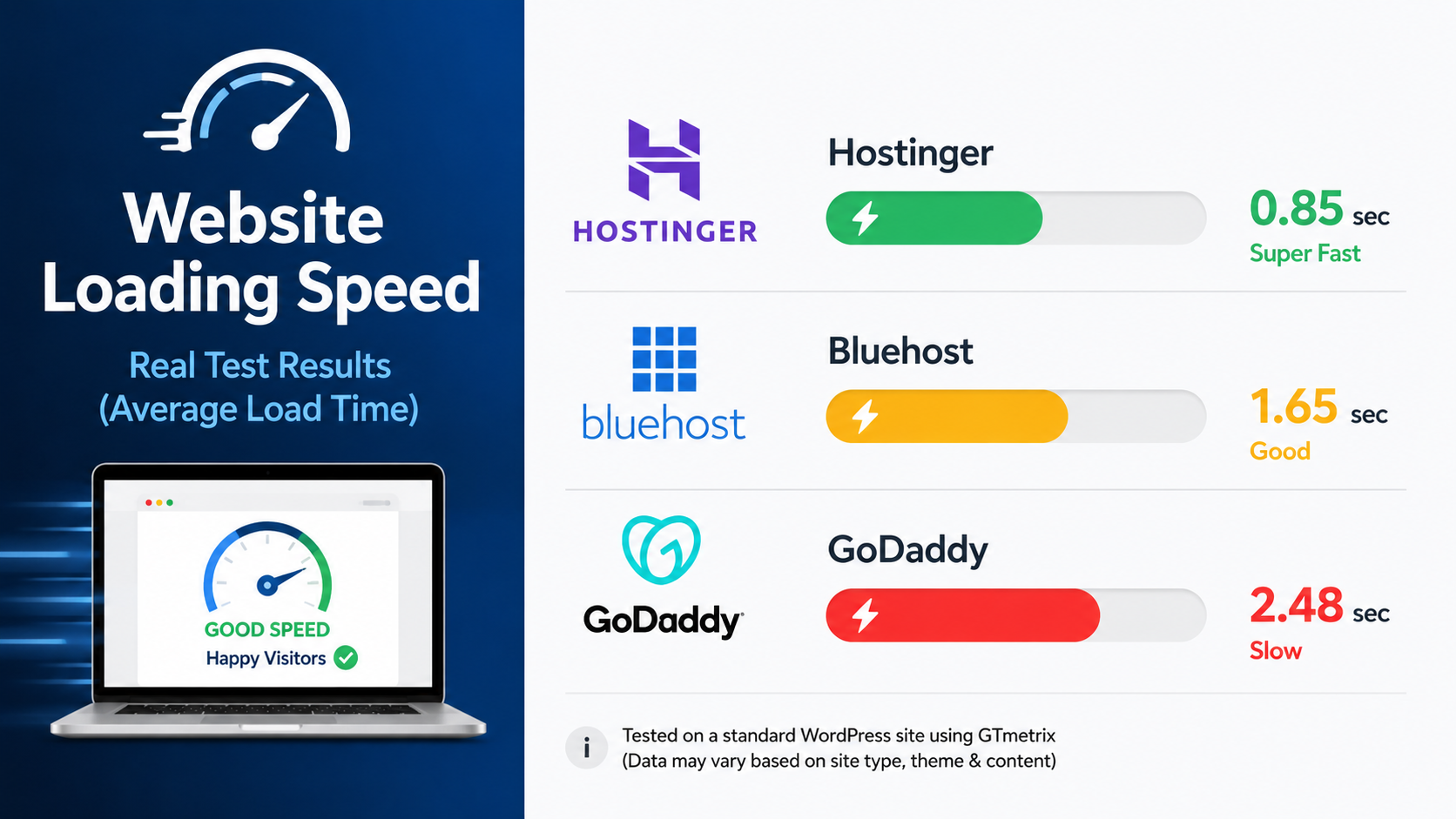
Hostinger came out near the top for speed and price. Our test site loaded in under 1.5 seconds on average, and the one-click WordPress install took less than two minutes. Their hosting plans are built with WordPress in mind, so you’re not stuck manually configuring caching or SSL certificates.
The support chat answered our test question in under three minutes, which was faster than most of the other hosts we tried. Pricing stays reasonable at renewal too, which isn’t something every host can say.
If you’re comfortable setting things up yourself, Hostinger is one of the better options out there right now, especially if budget matters and you don’t want to compromise on speed.
Bluehost
Bluehost is one of the most recommended hosts for WordPress, mostly because WordPress itself has recommended it for years. It’s solid and reliable, but our test site loaded slower than Hostinger, averaging around 2.3 seconds. Renewal pricing also jumps up more noticeably after the first term.
It’s a fine choice if you want a big, well-known name and don’t mind paying more down the line.
GoDaddy
GoDaddy is everywhere, mostly because of how much they advertise. Performance in our test was the weakest of the three, with load times closer to 3 seconds and a couple of short downtime blips during our 30-day window. Their WordPress setup is easy enough, but you’ll likely need to buy extra add-ons to get the speed and security that come standard with the other two.
So Which One Should You Pick?
If speed and price are your priority and you’re willing to do the setup yourself, Hostinger is a strong pick. If you want the WordPress.org seal of approval and don’t mind a bit less speed, Bluehost works fine. GoDaddy is convenient if you already registered your domain there, but it’s not our first choice for performance.
That said, picking a host is only step one. You still need to install WordPress correctly, choose a theme that won’t slow things down, set up caching, configure security, and connect everything to a working contact form and analytics. That’s the part most people underestimate, and it’s usually where things go wrong.
If you’d rather skip the setup entirely, Omayik Digital builds and hosts WordPress sites the right way from day one, so you’re not troubleshooting plugin conflicts six months in. Check out our web design packages and pricing or see how we compare hosting options in more depth in our Hostinger vs Bluehost vs GoDaddy breakdown.
Either way, don’t let hosting be the thing that quietly kills your site’s performance. It’s an easy problem to avoid once you know what to check.
Leave a Reply